The Wedding Command Center

$40.00

Your wedding shouldn't live in fourteen different apps. Not anymore.

You said yes. Then came the quotes, the deposits, the guest list and the group chat. Now it's 11pm and you're digging through email to find out whether the photographer's second payment was due this week.

There's a calmer way. One file, every detail, always up to date.
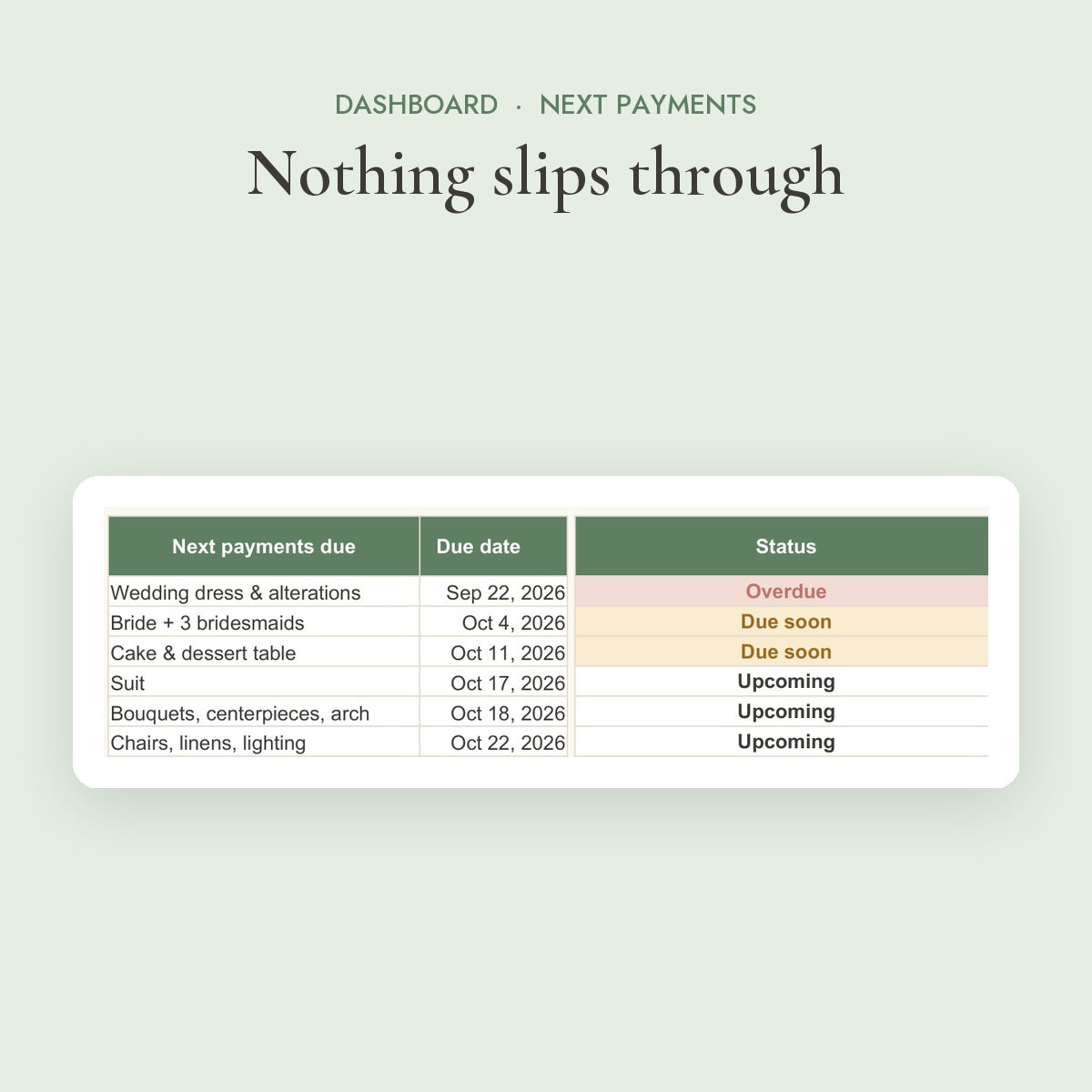
Know what to pay, and when

Every deposit and balance with its due date. The dashboard flags what's due soon and what's overdue, before a vendor has to chase you.

Your real cost per guest

See how every extra invitation changes the total, so the guest list and the budget finally agree with each other.

60 DAYS

Zero risk. 60-day guarantee.

Not the right fit for you? Email us within 60 days and get a full refund. No forms, no hassle.

Instant access | Sent to your email right after checkout
Google Sheets + Excel
Works on your phone
Instant email delivery
60-day guarantee
Use it for two full months of planning. If it isn't making your wedding easier, email us and we'll refund you in full.
Do I need Excel?

No. You get both versions: a Google Sheets copy that works free in any browser and on the Google Sheets app, and an Excel file for Microsoft Excel on Windows or Mac.

Most couples use the Google Sheets version because it's free and works on the phone.

How do I receive it?

By email, a few seconds after checkout. The email contains your Google Sheets link (click "Make a copy" and it's yours) and the Excel download, plus any extras included in your bundle.

Nothing arrives by post. If you can't find the email, check your spam or promotions folder, or write to us and we'll resend it.

Can my partner and I both edit it?

Yes. Share your Google Sheet with your partner, your planner or your parents, and everyone sees the same numbers in real time. Update an RSVP on your phone and the dashboard changes for both of you.

I'm already months into planning. Is it too late?

Not at all. Enter what you've already booked and paid, mark the finished tasks as done, and the Command Center shows you only what's left. It's often most useful in the busy last six months.

Is it hard to set up?

It comes filled in with an example wedding, so you can see how everything works before you type a thing. Add your names, date, budget and guest count on the Start Here tab and the rest updates itself.

You type only in the cream cells. Everything else calculates on its own, so there are no formulas to write.

Does it work in US and Australian dollars?

Yes. Amounts show with the $ sign, which works for both. If you plan in another currency, you can switch the format in two clicks.

How does the money-back guarantee work?

If the Command Center isn't making your planning easier, email us within 60 days of purchase and we'll refund you in full. No forms and no questions to fill in.

Payments due list with Paid, Due soon and Overdue labels

Stop Guessing What's Due

Every deposit and balance lives next to its due date. Your next six payments sit on the dashboard, labelled Paid, Due soon or Overdue, so nothing slips through.

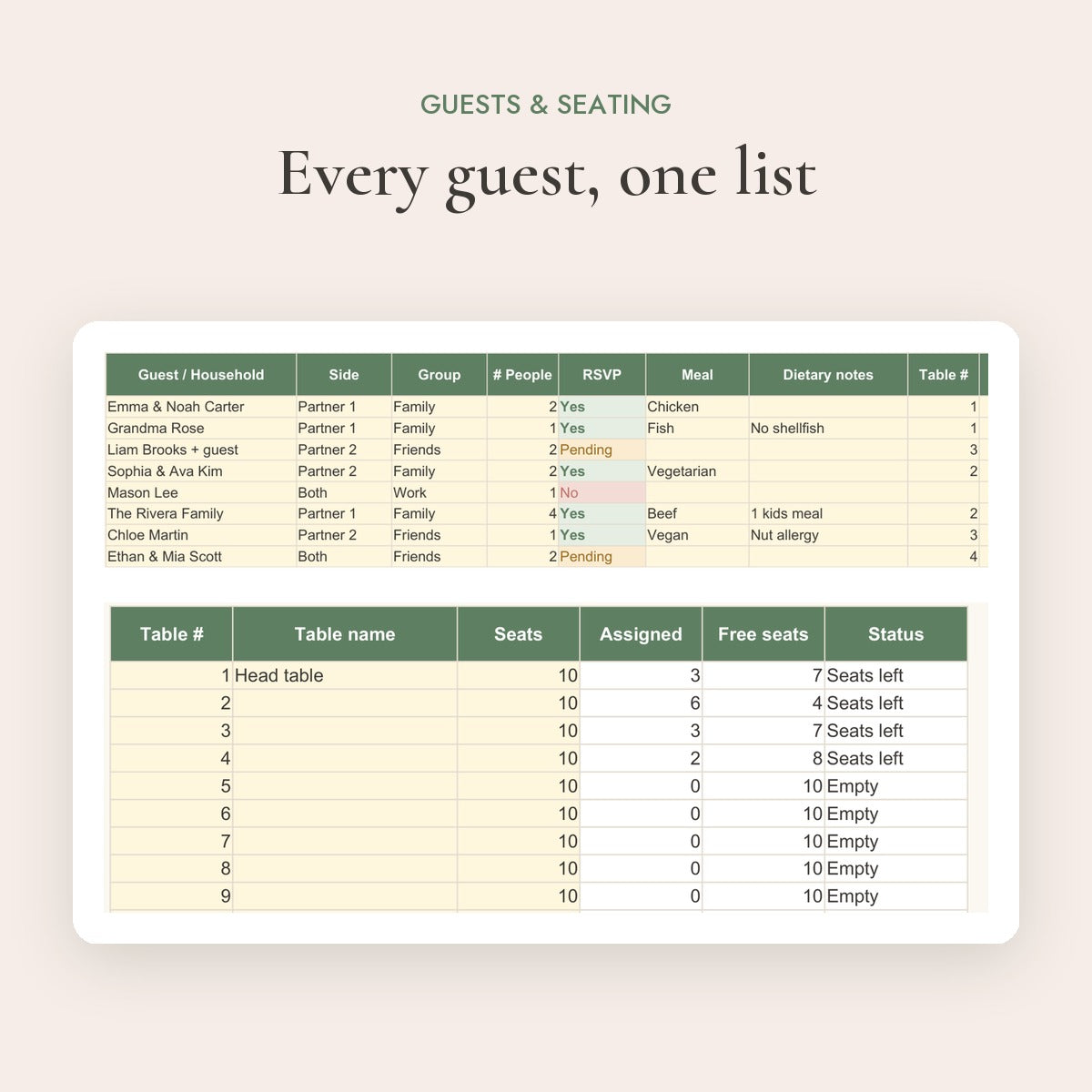
Guest list with RSVP, meals and table numbers

One List, Every Guest

RSVPs, meal choices, allergies and table numbers in one place. Tables fill up by themselves and the headcount on the dashboard is always right.

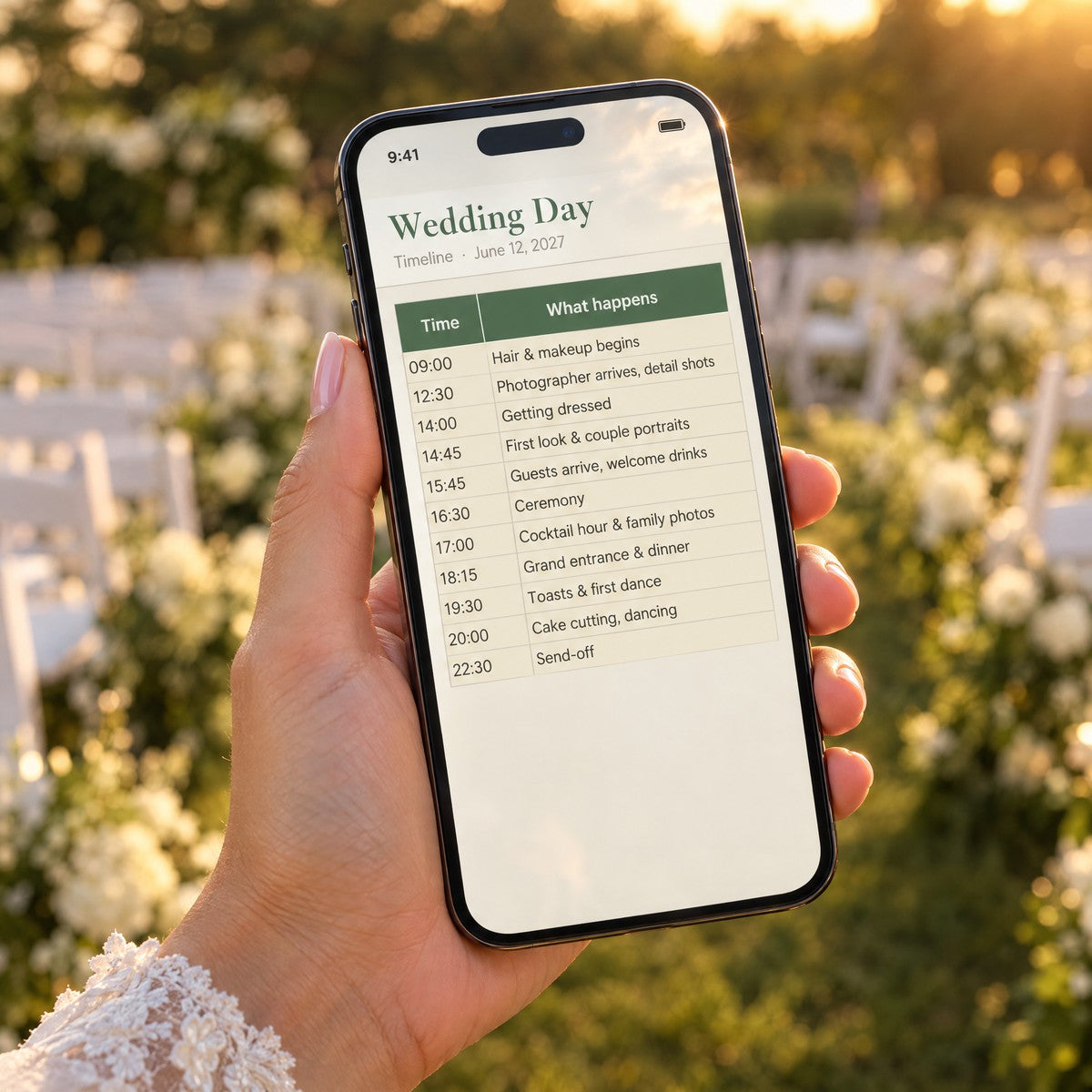
Wedding day timeline shared with vendors

Hand Over the Big Day

Share the day-of timeline with your coordinator, photographer and wedding party. Everyone knows where to be, and you get to enjoy your own wedding.

Free wedding template compared with the Wedding Command Center

Free Templates

  • ✕ No due-date alerts
  • ✕ Budget and guests apart
  • ✕ Blank page to start
  • ✕ No one to ask

COMMAND CENTER

  • ✓ Payment alerts
  • ✓ Everything connected
  • ✓ Filled-in example
  • ✓ Real human support

A plan, not just a spreadsheet

A free template gives you a list of categories and an empty total. It doesn't tell you the florist's balance is due Friday, or that twelve extra guests just added $1,400 to the bill.

The Command Center connects your budget, guests, vendors and dates, so every change updates the whole picture. You spend less time managing the wedding and more time looking forward to it.

Why couples choose the Command Center

Planning a wedding shouldn't mean juggling tabs, apps and sticky notes. Here's what you get compared with a free template.

OursFree
Payment Due Dates & Alerts
Real Cost per Guest
Guest List with RSVP & Meals
Seating That Fills Itself
Vendor Quote Comparison
Checklist Timed to Your Date
Day-of Timeline to Share
Works on Your Phone
Filled-in Example to Start
60-Day Guarantee
The Wedding Command Center on laptop and phone

Set up in the time it takes to drink a coffee

No formulas to write and no design skills needed. Here's how it works after checkout.

1

Check your inbox

Seconds after checkout you get an email with your Google Sheets link and the Excel file. Click "Make a copy" and it's yours.

2

Add your details

Type your names, wedding date, budget and guest count on the Start Here tab. The example wedding shows you where everything goes.

3

Plan from one place

Add costs, guests and vendors as they come. The dashboard shows what's due, who's coming and what's next, every time you open it.